Arm it: a women's safety app for travelling alone
Arm it is a women's safety app for travel, a safety check-in built into the HelloMates solo travel app. Before a night out, a first meet-up with someone new, a late ride home or a long bus ride, you set a check-in hour on your destination's clock and tick the people at home who should hear from you. Check in on time and nothing is sent. Miss it, and they get a message with your last known location and the emergency numbers of the city you are in.
A personal safety app that acts when you go quiet
Most solo female travel advice comes down to one habit: someone should know where you are going and notice if you do not come back. "I'll text you by midnight" works only if you both remember, and if your friend knows what to do at 3 AM their time.
Arm it does the remembering. You pick a check-in time and the people to tell, and add a short note about where you are going. Check in before the time and nobody hears a thing. If you do not, the app reminds you, and if you still do not check in, it sends your people a message that is already written: when you were due, your last known location, your note, and the emergency numbers for your destination. That is all it does, and we would rather say so plainly than promise more.
That makes it a different kind of safety app for women than a panic button. You do not have to reach your phone, unlock it or press anything when something goes wrong. Arm it acts on the one thing it can notice from far away: that you did not check in when you said you would.
Who this travel safety app is for
Arm it is for anyone travelling alone, and it was designed with women travelling solo in mind:
- A night out in a new city: rooftop bars in Bangkok, a night market in Hanoi, a beach club in Bali. Set the check-in for when you expect to be back in your room.
- Meeting someone new: a coffee or a date with someone you met on the road. Put their name and the place in the note.
- Getting home late: check in once you are through your door.
- A safe arrival check-in: landing late in a new city, or a night bus into Hanoi, Chiang Mai or Ubud. Set the check-in for a little after you expect to reach your room, and tap "I'm back, disarm" when you arrive. Arm it does not detect your arrival on its own; your tap is what tells it you made it.
- A solo hike or a long bus, train or ferry: the Arm it screen takes a date as well as an hour, so a check-in can be tomorrow evening or after a two-day trek.
It sits alongside the rest of HelloMates, including a women's lane with women-only plans and invitations for finding other women to explore a city with. You do not need any of that to use Arm it.
How an armed evening works
Say you are in Bangkok, meeting new friends for dinner, and you expect to be back by 11:30 PM.
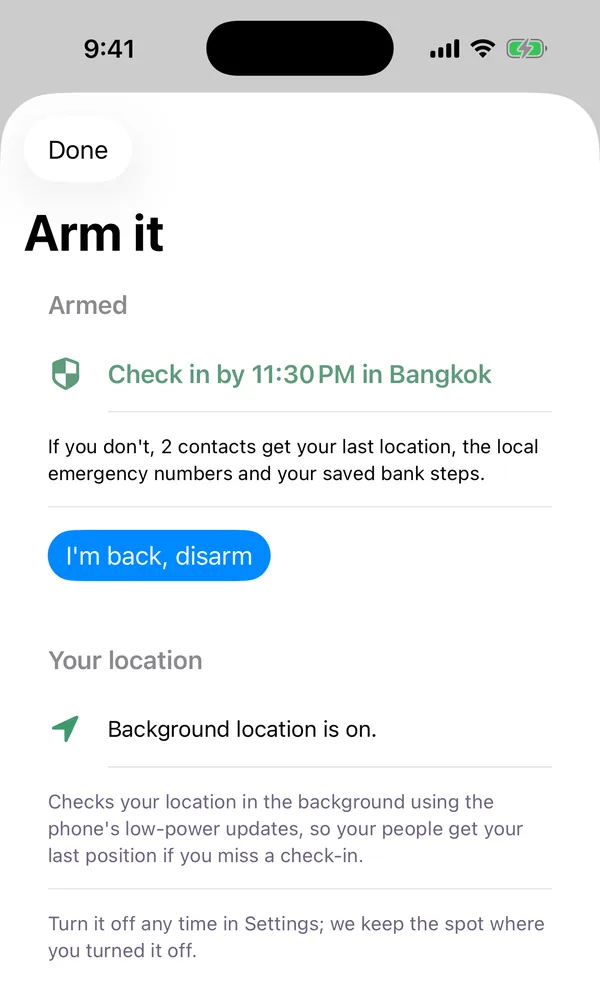
- Before you go out, you set 11:30 PM Bangkok time, tick your sister and your best friend, add "Dinner in Ari, then a taxi back to the hostel" and tap Arm it. The shield on the Tonight tab turns green and counts down.
- If you get home first, you tap "I'm back, disarm" and nothing is ever sent.
- At 11:30 PM, if you are still armed, a check-in reminder appears on your phone. It says how many minutes you have before your contacts get your message, and tapping it opens Arm it.
- A few minutes after the deadline, if you still have not checked in, the people you ticked get the message by text or email, and you get a notification saying they were told.
- If a contact cannot be reached on any channel, the app tells you so you can call them.
Set up a check-in, step by step
You can arm your first check-in while signing up, on the "Arm tonight" step: an hour on your destination's clock and one person, with "Skip for now" if you would rather wait.
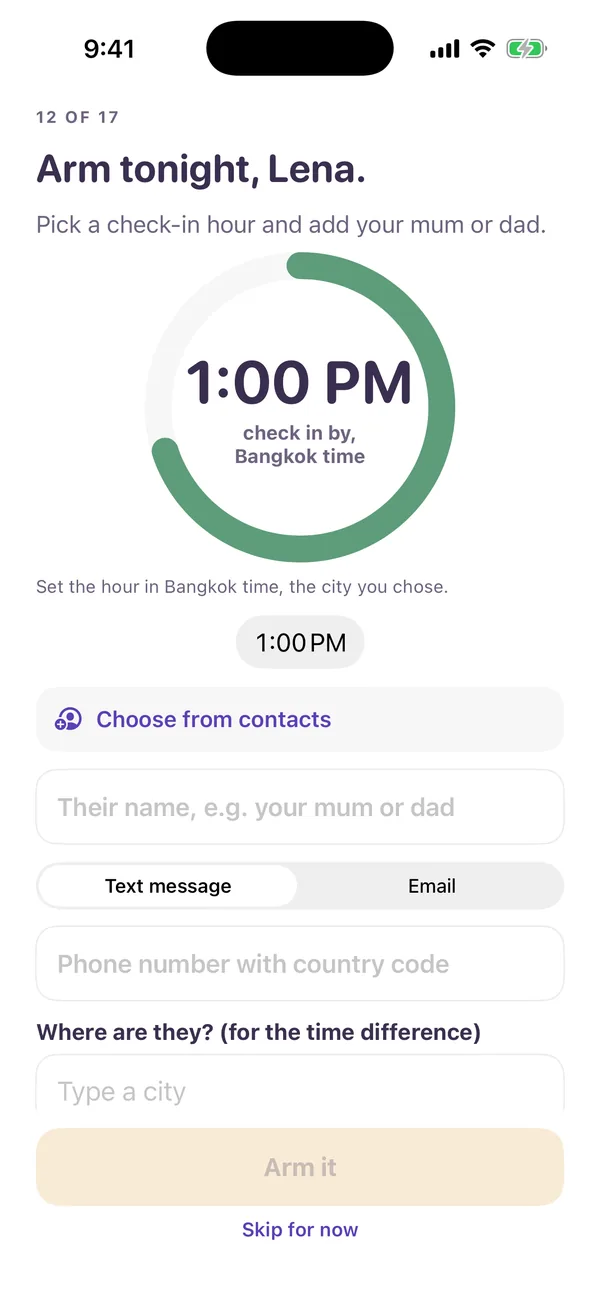
After that, Arm it lives behind the checkered shield at the top of the Tonight tab. To schedule a check-in:
- Check your city. The city at the top of the Tonight tab is the destination you chose in the app. The check-in hour and the emergency numbers both follow it.
- Tap the shield to open Arm it.
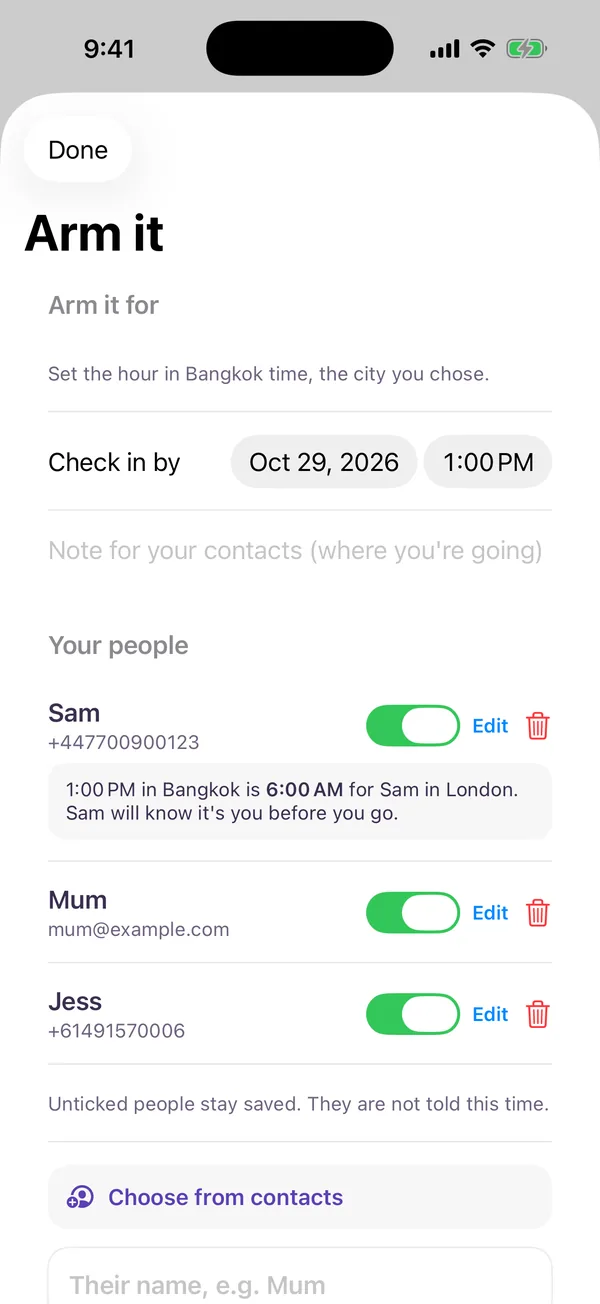
- Set "Check in by". Pick the date and the hour. The line above says whose clock it is, for example "Set the hour in Bangkok time, the city you chose."
- Add a note: where you are going, who with, how you are getting back. It goes into the message word for word.
- Add your people. Tap "Choose from contacts" or type a name and a phone number or email, and choose Text message or Email for each person.
- Tick who is told this time. Everyone starts ticked; untick anyone you want left out.
- Tap Arm it. The first time, you confirm the Arm it terms, and the app explains why it asks for background location before iOS shows its own prompt.
Choosing who is told
Your Arm it people are a small address book on your phone, up to five people, each with a tick switch, Edit and Remove.
Choose from contacts
This opens the phone's own contact picker. HelloMates does not ask to read your address book: the picker runs outside the app and hands back only the person you tap. Picking someone only fills in the form; nothing is saved until you tap Add.
Add the country code
Your people are usually in another country, so a number needs its international code. Without one, a red line says "Add the country code at the start, like +1 or +44." A UK mobile should start with +44, not 07.
Ticking, editing and removing
Unticking is not deleting: "Unticked people stay saved. They are not told this time." Every tick starts on again each time you open the screen, so a choice from an old trip never quietly leaves someone out. If you untick everybody, the Arm it button turns off with "Nobody would be told. Tick at least one person." Edit fixes a typo; Remove is the only thing that deletes someone.
Tell them first
Before you add someone, tell them what the message looks like and what you would like them to do if it arrives: try calling you, call your accommodation, then use the local numbers in the message. Only add people who agreed to it.
The hour is on your destination's clock
Arm it reads the check-in hour on the clock of the city you chose in the app, never your phone's, and every line on the screen names that city. Pick 11:30 PM with Bangkok chosen and it means 11:30 PM in Bangkok, even if your phone is still on home time.
Add the city a contact lives in and the screen shows the same moment on their clock: "1:00 PM in Bangkok is 6:00 AM for Sam in London." Your message may land while they are asleep, which is one more reason to tell them in advance.
What your contacts receive
If you miss your check-in, each ticked person gets one text or email. This is the real text a contact called Sam in London would receive for an 11:30 PM check-in in Bangkok, produced by the code the app uses:
Hi Sam,
Maya set a check-in for Sat, 4:30 PM GMT in Bangkok and has not checked in.
11:30 PM here is 4:30 PM for Sam in London.
Last seen Sat, 11:10 PM GMT+7 near https://maps.google.com/?q=13.7563,100.5018
Their note: Dinner then a rooftop bar near Sukhumvit, back to the hostel by taxi
Emergency numbers in Bangkok, Thailand: 191. Ambulance 1669. Fire 199. Tourist police 1155.
If their phone may be lost: open Find My (https://www.icloud.com/find) and use Mark as Lost if you share their Family group.
Card freeze: use the bank steps Maya saved with you, or call the bank's 24h line.
This message was sent by HelloMates on Maya's instruction. HelloMates does not contact emergency services.
Reply STOP to stop these messages.
- Last seen is the last position your phone reported, as a map link with its time. With no position, it says "no location shared".
- The emergency numbers are your destination's, not your contact's country, with the tourist police or tourist helpline where we have checked one on an official page. Hanoi reads "Police 113. Ambulance 115. Fire 114." and Bali, set under Denpasar, reads "112. Police 110. Ambulance 119. Fire 113." Where we hold no checked number, the message says so rather than guess.
- Find My and card freeze are steps your contact takes with Apple and your bank; HelloMates does not lock your phone or freeze your cards.
- The closing line says HelloMates does not contact emergency services, so nobody assumes help is already on the way.
Checking in and the reminder
Checking in is one tap: open Arm it and press "I'm back, disarm". The shield returns to normal and the reminder is cancelled. At your check-in time, if you are still armed, a notification titled "Check in" shows the minutes left, and tapping it opens Arm it even if the app was closed. Allow notifications for HelloMates so you see it. Your contacts are messaged only if that time runs out without a check-in.
Your location and privacy
When you first arm, the app explains why and asks iOS for "always" location. It then uses the phone's low-power background updates (never continuous tracking) while you are armed or while "Share location for Arm it" is on in Settings. Turn that off and it keeps only the spot where you turned it off.
- Your location reaches your contacts only inside the missed check-in message.
- Nothing about Arm it is shown to other people on HelloMates.
- Arm it location fixes are deleted after 30 days, and you can delete your contacts and note at any time.
- Your contacts' details are used only to deliver your message, and they can reply STOP.
Details: privacy policy and Arm it terms.
What Arm it does not do
- It does not call the police, an ambulance or any other emergency line, and nobody at HelloMates watches your timer.
- It does not send anyone to you, freeze your cards, lock your phone or find your phone.
- It cannot promise delivery: a message can fail or arrive late.
- It is not a replacement for emergency services, travel insurance or telling someone where you are going.
Use it as one layer of a plan, next to our solo female travel safety tips and the solo travel safety checklist.
How to stay safe while traveling alone
No app keeps you safe on its own. These are the habits that government travel advice and experienced solo travellers come back to again and again, and where a safety check-in app fits among them.
- Read your government's advice for the country before you book, and again before you fly. Many governments publish a section for women travellers, and it covers local laws, scams and areas to avoid.
- Save the local emergency numbers in your phone before you land, not after you need them. Our emergency numbers by country list has the police, ambulance and fire numbers, plus the tourist police where we have checked one.
- Book your first night and know how you will get there. Arriving in daylight, with an address saved offline and an official taxi rank or ride app chosen in advance, takes a lot of guesswork out of the riskiest hour of a trip.
- Leave your plans with someone at home: where you are staying, where you are going tonight and when you expect to be back. This is the habit Arm it turns into a routine.
- Keep your phone charged and carry a small power bank. A check-in, a map and a ride home all depend on it.
- Keep copies of your passport and cards somewhere apart from the originals, and note your bank's 24 hour line so a lost card is a phone call, not a crisis.
- Watch your drink and trust your instincts. You never owe anyone a reason for leaving, and a plan you can change at any time is a plan that works.
- Meet new people in public places first, and tell someone who you are meeting and where.
- Get travel insurance that covers medical care where you are going.
Arm it covers the "someone should notice" part of that list. Before you head out, arm a check-in, tick the people who agreed to watch for it, and get on with your evening.
Emergency numbers in Thailand, Vietnam and Bali
Save these before you go. They are the numbers Arm it puts in the message, and each country has its own page with when to call which:
- Emergency number Thailand: police 191, ambulance 1669 and fire 199, Tourist Police 1155. See emergency numbers in Thailand, and more on solo female travel there in is solo travel safe in Thailand.
- Vietnam: police 113, ambulance 115 and fire 114. See emergency numbers in Vietnam and our guide to solo travel in Vietnam.
- Emergency number Indonesia, including Bali: 112 for any emergency, police 110, ambulance 119 and fire 113. See emergency numbers in Indonesia and Bali.
Asking whether Bali is safe for solo female travellers? Read two governments' advice for Indonesia, including the section for women, and keep the same habits as anywhere: your own way home, a charged phone, and someone who will notice if you go quiet.
Questions
Does Arm it call the police or an ambulance?
No. Arm it never contacts the police, an ambulance or any other emergency service, and it sends nobody to you. It messages the people you ticked. If you are in danger, call the local emergency number yourself.
Who gets the message if I miss my check-in?
Only the saved people you ticked for that arm, by text message or email. Unticked people stay saved and are not told, and nobody else on HelloMates sees your Arm it.
Whose time zone is the check-in hour in?
Your destination's: the city you chose in the app. 11:30 PM with Bangkok chosen means 11:30 PM in Bangkok, even if your phone is still on home time.
Do my contacts need the HelloMates app?
No. The message arrives as an ordinary text or email. They can stop future messages by replying STOP or using the link in the email.
Is the message guaranteed to arrive?
No. Delivery depends on your phone, battery and signal, your contact's carrier and the services in between. HelloMates retries and tries a second channel where it can, but cannot promise delivery, so do not make Arm it your only safety plan.
Is Arm it a personal safety app?
Yes, in one specific way: it is a personal safety app built around a check-in. You set a time, and if you do not check in by then, the people you ticked get a prepared message with your last known location and the local emergency numbers. It is not a panic button, it does not stream your location to anyone, and it contacts no emergency service.
Does Arm it work as a safe arrival app?
Yes. Set the check-in for when you expect to arrive, on your destination's clock, and tap "I'm back, disarm" once you are there. Arm it does not detect your arrival by itself, so the tap is what tells it you are safe. If you have not tapped by the time you set, your ticked people get your message.
Can I check in early or change my plans?
Yes. Tap "I'm back, disarm" at any time and nothing is sent. To change the hour or the people, disarm and arm again.
Read next: solo female travel safety tips, emergency numbers by country and first solo trip tips.